Diagnosing Packaged Build Start Problems
How to find the problem when a packaged build won't start when run from the command line.
Intro
Packaging a project from the Unreal Editor creates executable files in the packaged directory. If we package the project the directory "PackagedDebug" we get these file (and others):
PackagedDebug\Windows\PROJECT_NAME PackagedDebug\Windows\PROJECT_NAME.exe PackagedDebug\Windows\PROJECT_NAME\Binaries\Win64\PROJECT_NAME-Win64-DebugGame.exe PackagedDebug\Windows\PROJECT_NAME\Binaries\Win64\tbb12.dll PackagedDebug\Windows\PROJECT_NAME\Binaries\Win64\tbbmalloc.dll
The executable PackagedDebug\Windows\PROJECT_NAME.exe is just a small file which loads the real executable in PackagedDebug\Windows\PROJECT_NAME\Binaries\Win64\PCPROJECT_NAME-Win64-DebugGame.exe
To avoid problems with not finding .dll files, we change into the directory PackagedDebug\Windows\PROJECT_NAME\Binaries\Win64 and run the file PROJECT_NAME-Win64-DebugGame.exe:
cd PackagedDebug\Windows\PROJECT_NAME\Binaries\Win64
PROJECT_NAME-Win64-DebugGame.exe
If everything works, the game starts and there is no problem. If the game does not start, we need to delve into why.
Logs
Ideally when the executable runs it creates a log file.
This appears in
PackagedDebug\Windows\PROJECT_NAME\Saved\Logs\PROJECT_NAME.log
If this file exists, you can open it and hopefully find the reason for the start failure.
You can also add the "-log" command line option to show the log file in a window as the process runs:
PROJECT_NAME-Win64-DebugGame.exe -log
The window will open like this:
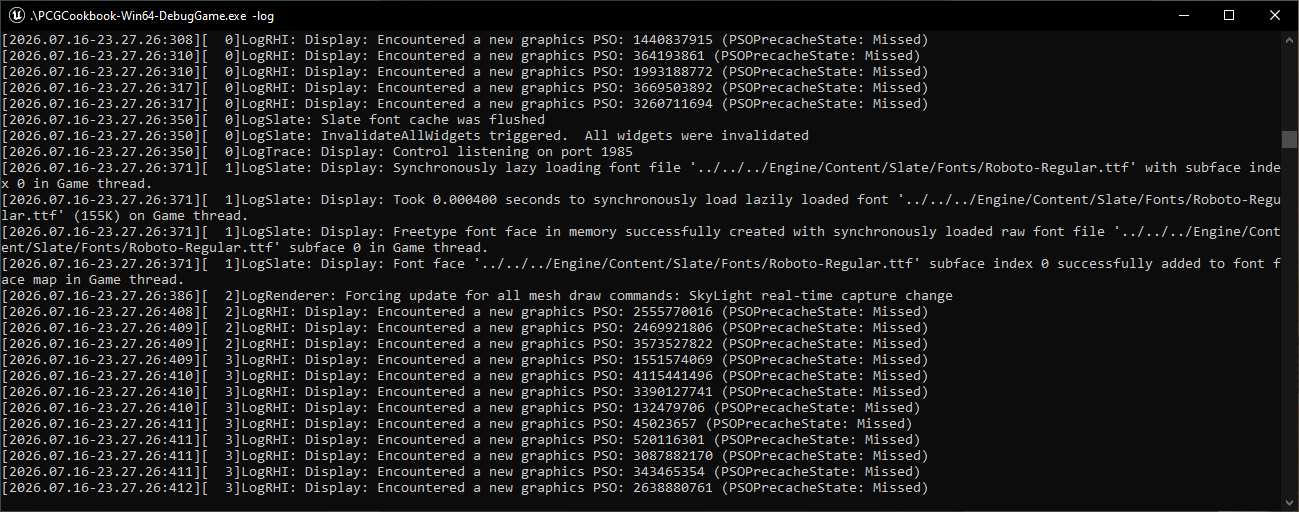
The log file will still be created in the PackagedDebug\Windows\PROJECT_NAME\Saved\Logs directory.
As you run the program multiple times, the most recent log file is always called PROJECT_NAME.log and the old versions are renamed to something like PROJECT_NAME-backup-2026.07.16-23.30.07.log
What if there are no logs
The executable needs to reach a certain stage before logging starts. If the program crashes before Unreal has setup logging, no log file will be created, the main game window won't open and the command will appear to do nothing.
You can run the executable with the "-waitforattach" option and then connect the debugger. The command is:
cd PackagedDebug\Windows\PROJECT_NAME\Binaries\Win64
PROJECT_NAME-Win64-DebugGame.exe -waitforattach
If the program does not crash before WinMain() is called, this will halt the program until you connect the debugger.
To connect from Visual Studio, use the Debug | Attach to Process... menu option and connect to the PROJECT_NAME-Win64-DebugGame.exe executable. Then use F5 to continue and debug as usual.
What if the process crashes before WinMain()
In this case -waitforattach will not work. "-waitforattach" is implemented inside the call to WinMain(), so if WinMain() is never reached this option will not work.
Now you need to configured Visual Studio to execute the packaged command line. Use the Project | Properties menu, select the "Debugging" option on the left, and change the Command property to the PackagedDebug\Windows\PROJECT_NAME\Binaries\Win64\PROJECT_NAME-Win64-DebugGame.exe path. Clear the command arguments so it looks like this:
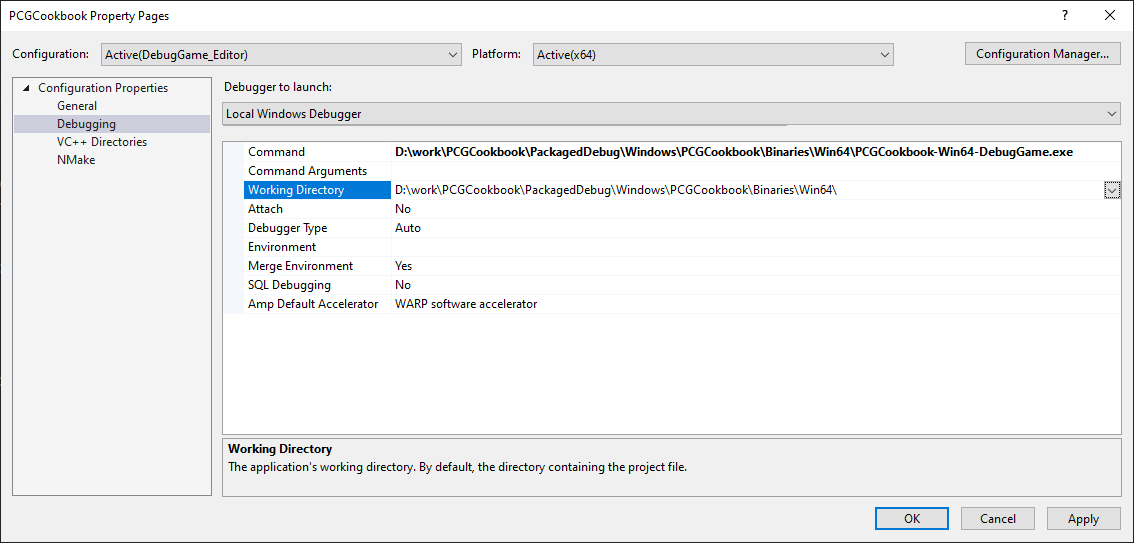
Press F5, the program should run. If it stops at the crash point, debug from there. If it does not stop and just exits, restart using F10 to step through the code till it crashes.
To restore the project properties to what they were, either note them down first, or delete the Intermediate\ProjectFiles directory and regenerate the Visual Studio project files from the .uproject file.
What crashes a process before WinMain() is called
For one, initialization of statics. This code will sometimes crash:
namespace
{
const FName NodeName( "Add Components" );
const FText NodeTitle = FText::Format( LOCTEXT( "NodeTitle", "PCG | {0}" ), FText::FromName( NodeName ) );
}
The call stack when it crashes looks like this:
FDebug::ProcessFatalError(void *)	C++
UE::Logging::Private::BasicFatalLog<char>(struct UE::Logging::Private::TStaticBasicLogRecord<char> const &,struct FLogCategoryBase const *,...)	C++
FICUInternationalization::Initialize(void)	C++
FLazySingleton::Construct<class FInternationalization>(void *)	C++
FInternationalization::Get(void)	C++
FTextFormatter::FormatStr(class FTextFormat const &,class TArray<class FFormatArgumentValue,class TSizedDefaultAllocator<32> > const &,bool,bool)	C++
FTextFormatter::Format(class FTextFormat &&,class TArray<class FFormatArgumentValue,class TSizedDefaultAllocator<32> > &&,bool,bool)	C++
FText::Format(class FTextFormat,class TArray<class FFormatArgumentValue,class TSizedDefaultAllocator<32> > &&)	C++
FText::Format<class FText>(class FTextFormat,class FText)	C++
`anonymous namespace'::`dynamic initializer for 'NodeTitle''() Line 41	C++
ucrtbase.dll!00007ffa9259e473()	Unknown
__scrt_common_main_seh() Line 258	C++
kernel32.dll!00007ffa932f7374()	Unknown
ntdll.dll!00007ffa94abcc91()	Unknown
It looks as though the FTextFormatter is calling FInternationalization::Get() before the FICUInternationalization has been initialized. The reason it only crashes sometimes, and never when running in the editor, it that it depends on the sequence in which dlls are loaded and statics are initialized.
Feedback
Please leave any feedback about this article here